Kubernetes Gateway API: The Modern Replacement for Nginx Ingress
Dennis Weston
December 6, 2025
Quick Navigation
- The Problem
- What is Gateway API
- Why Gateway API Over Ingress
- Core Concepts
- Migration Strategy
- Implementation Guide
- Common Pitfalls
- Getting Started
The Problem
Your Kubernetes cluster is running nginx ingress controller. It's working fine. You can route HTTP traffic to services, handle TLS termination, and configure basic routing rules.
Then requirements evolve.
Product wants A/B testing based on HTTP headers. Security mandates mutual TLS for certain routes. Platform team needs to delegate routing control to application teams without giving them cluster-admin access. You want to split traffic between versions for canary deployments.
You discover nginx ingress wasn't designed for this. Every controller vendor has custom annotations for advanced features. Your ingress manifests are littered with nginx.ingress.kubernetes.io/ annotations that won't work with any other ingress controller. You're locked in.
The Ingress Resource Limitations
The Ingress resource was created in Kubernetes 1.1 (2015). It solved basic HTTP routing but hasn't evolved with modern traffic management needs:
Limited expressiveness - You can't route based on HTTP methods, headers, or query parameters without vendor-specific annotations.
No traffic splitting - Canary deployments require external tools or controller-specific features.
Single controller assumption - One ingress controller per cluster. Multi-tenancy is difficult.
Role separation problems - Application teams either have too much access (cluster-wide ingress controller config) or too little (can't control routing at all).
Vendor lock-in through annotations - Every advanced feature uses proprietary annotations. Migrating between controllers means rewriting manifests.
TCP/UDP limitations - Ingress is HTTP-only. For non-HTTP protocols, you need separate resources and controllers.
The Kubernetes community recognized these limitations. The solution is Gateway API.
What is Gateway API
Gateway API is the next-generation routing API for Kubernetes. It's not just "Ingress v2"—it's a complete rethinking of how traffic routing should work in Kubernetes.
Gateway API provides:
- Expressive routing for HTTP, HTTPS, TCP, UDP, and gRPC
- Role-oriented design separating infrastructure, security, and application concerns
- Portable configs that work across different implementations
- Advanced traffic management including weighted routing, header manipulation, and request mirroring
- Multiple controllers in the same cluster with clear resource ownership
It's a Kubernetes SIG-Network project, built into Kubernetes itself (though implementations are separate). The API graduated to GA (Generally Available) in October 2023.
Gateway API vs Ingress
Think of Ingress as a simple HTTP router. Gateway API is a comprehensive traffic management platform.
Ingress says "route example.com/api to service api-server." Gateway API says "route example.com/api to service api-server, but send 10% of traffic to api-server-canary, only for requests with header X-Beta-User, and if the canary returns errors roll back automatically."
This isn't theoretical. Gateway API standardizes features that previously required service meshes or proprietary ingress controller extensions.
Why Gateway API Over Ingress
Role-Oriented Design
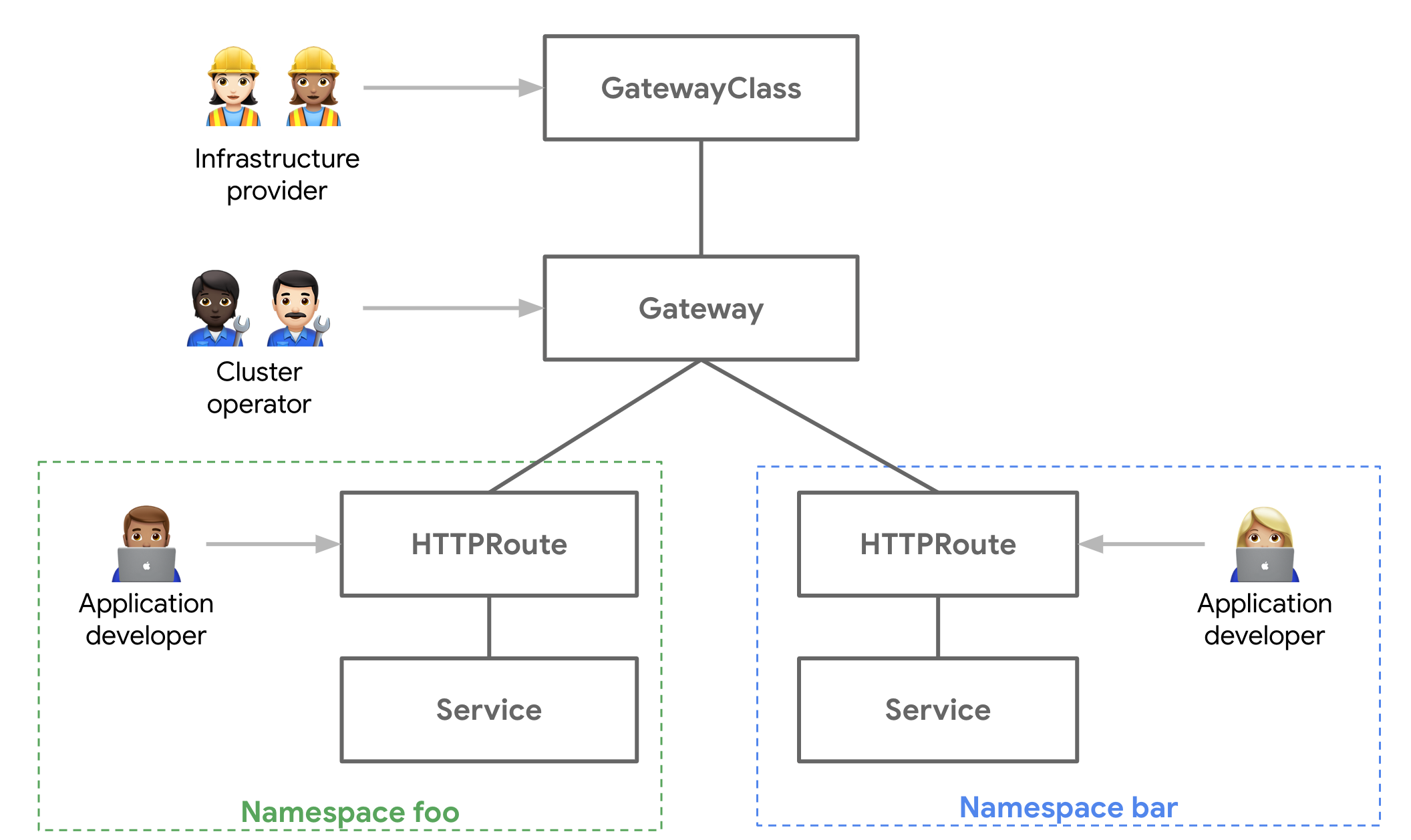
Gateway API splits concerns across three personas with clear boundaries:
Infrastructure Provider (Platform team) - Provisions and manages gateway infrastructure. Configures TLS certificates, IP addresses, and infrastructure-level policies. Controls what capabilities are available to applications.
Cluster Operator (DevOps/SRE) - Configures gateway listeners, protocols, and cross-cutting concerns like rate limiting. Sets policies that apply to multiple applications.
Application Developer - Defines routing rules for their services. Cannot access infrastructure settings or other teams' routes.
This separation is enforced through different resource types with RBAC boundaries. Platform teams can delegate routing control without delegating infrastructure access.
With nginx ingress, you either give application teams cluster-wide ingress permissions (insecure) or make platform teams create every route (bottleneck).
Portable Configuration
Ingress resources are theoretically portable, but any advanced feature requires annotations:
apiVersion: networking.k8s.io/v1
kind: Ingress
metadata:
  annotations:
    nginx.ingress.kubernetes.io/rewrite-target: /
    nginx.ingress.kubernetes.io/ssl-redirect: "true"
    nginx.ingress.kubernetes.io/rate-limit: "100"
Switch from nginx to Traefik or Envoy? Rewrite every annotation.
Gateway API standardizes advanced features:
apiVersion: gateway.networking.k8s.io/v1
kind: HTTPRoute
spec:
  rules:
  - matches:
    - path:
        value: /api
    filters:
    - type: URLRewrite
      urlRewrite:
        path:
          type: ReplacePrefixMatch
          replacePrefixMatch: /
This works with any Gateway API implementation—Envoy Gateway, Istio, Cilium, Kong, or nginx's own Gateway API implementation.
Advanced Traffic Management
Gateway API standardizes capabilities that previously required service meshes:
Weighted traffic splitting - Route 95% to stable, 5% to canary. Adjust weights without changing application code.
Header-based routing - Route beta users to experimental features. Route mobile apps to optimized backends.
Request mirroring - Send copy of production traffic to new service version for testing. Responses are discarded—no user impact.
Request/response transformation - Add headers, rewrite URLs, modify responses. Standardized, not vendor-specific.
Cross-namespace routing - Services in namespace A can route to services in namespace B with explicit ReferenceGrants. Enables multi-tenant architectures with secure delegation.
Protocol support - HTTP/HTTPS, gRPC, TCP, UDP, TLS passthrough. One API for all protocols.
Better Multi-Tenancy
With Ingress, you typically run one controller per cluster. All teams share it. Conflicts are common—overlapping hostnames, conflicting configurations, noisy neighbor problems.
Gateway API supports multiple gateway controllers in one cluster. Different teams can use different gateways. Development teams can use lightweight gateways while production uses HA configurations with WAF integration.
Resource attachment policies let you apply configurations (rate limits, auth policies) to specific gateways or routes without modifying the route itself.
Core Concepts
Gateway API introduces new resources that work together:
GatewayClass
Defines a class of gateways (similar to StorageClass or IngressClass). Created by infrastructure providers.
apiVersion: gateway.networking.k8s.io/v1
kind: GatewayClass
metadata:
  name: istio
spec:
  controllerName: istio.io/gateway-controller
This says "when someone creates a Gateway with class 'istio', the Istio controller manages it."
Gateway
Represents a load balancer or proxy instance. Created by cluster operators.
apiVersion: gateway.networking.k8s.io/v1
kind: Gateway
metadata:
  name: external-gateway
  namespace: infra
spec:
  gatewayClassName: istio
  listeners:
  - name: http
    protocol: HTTP
    port: 80
  - name: https
    protocol: HTTPS
    port: 443
    tls:
      certificateRefs:
      - name: example-com-cert
This creates an actual load balancer that listens on ports 80 and 443. Application teams attach routes to this gateway.
HTTPRoute
Defines routing rules. Created by application developers.
apiVersion: gateway.networking.k8s.io/v1
kind: HTTPRoute
metadata:
  name: api-route
  namespace: apps
spec:
  parentRefs:
  - name: external-gateway
    namespace: infra
  hostnames:
  - api.example.com
  rules:
  - matches:
    - path:
        type: PathPrefix
        value: /v1
    backendRefs:
    - name: api-v1
      port: 8080
    - name: api-v2
      port: 8080
      weight: 10
This routes api.example.com/v1 to two backend services with 90/10 traffic split. Application team owns this route. Platform team owns the gateway.
Additional Route Types
TCPRoute - Route TCP traffic based on port and SNI. UDPRoute - Route UDP traffic based on port. GRPCRoute - Route gRPC with method and header matching. TLSRoute - Route TLS traffic with SNI matching but no termination.
ReferenceGrant
Security boundary for cross-namespace references.
apiVersion: gateway.networking.k8s.io/v1beta1
kind: ReferenceGrant
metadata:
  name: allow-apps-to-use-gateway
  namespace: infra
spec:
  from:
  - group: gateway.networking.k8s.io
    kind: HTTPRoute
    namespace: apps
  to:
  - group: gateway.networking.k8s.io
    kind: Gateway
This allows HTTPRoutes in namespace "apps" to reference Gateways in namespace "infra". Without this grant, cross-namespace references fail. This prevents application teams from hijacking infrastructure resources.
Migration Strategy
Phase 1: Assess Current State
Before migrating, understand what you're using:
Audit ingress resources - List all ingress objects and their annotations. Identify custom features you depend on.
kubectl get ingress --all-namespaces -o yaml > current-ingress.yaml
Identify nginx-specific features - Look for annotations like rate limiting, authentication, rewrites, custom headers. These need Gateway API equivalents.
Map to Gateway API features - Most nginx features have Gateway API equivalents. Complex rewrites might require implementation-specific extensions.
Check controller support - Does your chosen Gateway implementation support all features you need?
Phase 2: Choose Gateway Implementation
Multiple implementations exist. Choose based on your requirements:
Envoy Gateway - CNCF project, excellent Gateway API conformance, good for migration from Envoy-based ingress.
Istio Gateway - If you're running Istio service mesh, use its Gateway API implementation. Integrates with mesh features.
Cilium Gateway - If you use Cilium for networking, native Gateway API support with eBPF performance.
Kong Gateway - Commercial features, API management integration, good for API-heavy workloads.
nginx Gateway Fabric - nginx's official Gateway API implementation. Familiar to nginx users, not feature-complete yet.
Traefik - Popular open source option with good Gateway API support.
For pure nginx ingress replacement without additional features, Envoy Gateway or Cilium offer best conformance and performance.
Phase 3: Deploy Gateway Controller
Install your chosen implementation. Most use Helm:
# Example: Envoy Gateway
helm install eg oci://docker.io/envoyproxy/gateway-helm \
  --version v1.0.0 \
  --namespace envoy-gateway-system \
  --create-namespace
This installs the controller but doesn't affect existing traffic. Nginx ingress continues running.
Phase 4: Create Gateway Resources
Define GatewayClass and Gateway to replace nginx ingress:
apiVersion: gateway.networking.k8s.io/v1
kind: GatewayClass
metadata:
  name: envoy
spec:
  controllerName: gateway.envoyproxy.io/gatewayclass-controller
---
apiVersion: gateway.networking.k8s.io/v1
kind: Gateway
metadata:
  name: main-gateway
  namespace: gateway-system
spec:
  gatewayClassName: envoy
  listeners:
  - name: http
    protocol: HTTP
    port: 80
  - name: https
    protocol: HTTPS
    port: 443
    tls:
      mode: Terminate
      certificateRefs:
      - kind: Secret
        name: wildcard-cert
This provisions a new load balancer. You now have both nginx and Gateway API load balancers running.
Phase 5: Migrate Routes Incrementally
Convert ingress resources to HTTPRoutes one at a time:
Before (Ingress):
apiVersion: networking.k8s.io/v1
kind: Ingress
metadata:
  name: api-ingress
  annotations:
    nginx.ingress.kubernetes.io/rewrite-target: /
spec:
  rules:
  - host: api.example.com
    http:
      paths:
      - path: /api
        pathType: Prefix
        backend:
          service:
            name: api-service
            port:
              number: 8080
After (HTTPRoute):
apiVersion: gateway.networking.k8s.io/v1
kind: HTTPRoute
metadata:
  name: api-route
spec:
  parentRefs:
  - name: main-gateway
    namespace: gateway-system
  hostnames:
  - api.example.com
  rules:
  - matches:
    - path:
        type: PathPrefix
        value: /api
    filters:
    - type: URLRewrite
      urlRewrite:
        path:
          type: ReplacePrefixMatch
          replacePrefixMatch: /
    backendRefs:
    - name: api-service
      port: 8080
Test the HTTPRoute by pointing DNS or using host header overrides. Verify functionality before switching production traffic.
Phase 6: Update DNS and Monitor
When an HTTPRoute is validated:
- Update DNS to point to Gateway load balancer IP
- Monitor metrics for errors, latency changes
- Keep nginx ingress running as fallback
- After 24-48 hours of stable traffic, delete old ingress resource
Repeat for each route. Incremental migration reduces risk.
Phase 7: Decommission Nginx Ingress
When all routes are migrated:
- Verify no ingress resources remain
- Update monitoring and alerting to use Gateway metrics
- Uninstall nginx ingress controller
- Release load balancer resources
- Update documentation and runbooks
Implementation Guide
Basic HTTP Routing
Replace simple nginx ingress with HTTPRoute:
apiVersion: gateway.networking.k8s.io/v1
kind: HTTPRoute
metadata:
  name: web-route
spec:
  parentRefs:
  - name: main-gateway
  hostnames:
  - www.example.com
  rules:
  - matches:
    - path:
        type: PathPrefix
        value: /
    backendRefs:
    - name: web-service
      port: 80
Canary Deployments
Split traffic between stable and canary versions:
apiVersion: gateway.networking.k8s.io/v1
kind: HTTPRoute
metadata:
  name: app-route
spec:
  parentRefs:
  - name: main-gateway
  rules:
  - backendRefs:
    - name: app-stable
      port: 8080
      weight: 90
    - name: app-canary
      port: 8080
      weight: 10
Adjust weights over time. Roll back by setting canary weight to 0.
Header-Based Routing
Route beta users to experimental version:
apiVersion: gateway.networking.k8s.io/v1
kind: HTTPRoute
metadata:
  name: beta-route
spec:
  parentRefs:
  - name: main-gateway
  rules:
  - matches:
    - headers:
      - name: X-User-Group
        value: beta
    backendRefs:
    - name: app-experimental
      port: 8080
  - backendRefs:
    - name: app-stable
      port: 8080
Requests with header X-User-Group: beta go to experimental. Others go to stable.
Request Mirroring
Send production traffic copy to new service for testing:
apiVersion: gateway.networking.k8s.io/v1
kind: HTTPRoute
metadata:
  name: mirror-route
spec:
  parentRefs:
  - name: main-gateway
  rules:
  - backendRefs:
    - name: production-service
      port: 8080
    filters:
    - type: RequestMirror
      requestMirror:
        backendRef:
          name: test-service
          port: 8080
Production service handles requests normally. Test service receives copies but responses are discarded.
Cross-Namespace Routing
Allow application team to route to shared services:
# In shared-services namespace
apiVersion: gateway.networking.k8s.io/v1beta1
kind: ReferenceGrant
metadata:
  name: allow-app-team
  namespace: shared-services
spec:
  from:
  - group: gateway.networking.k8s.io
    kind: HTTPRoute
    namespace: app-team
  to:
  - group: ""
    kind: Service
---
# In app-team namespace
apiVersion: gateway.networking.k8s.io/v1
kind: HTTPRoute
metadata:
  name: app-route
  namespace: app-team
spec:
  parentRefs:
  - name: main-gateway
    namespace: gateway-system
  rules:
  - backendRefs:
    - name: shared-service
      namespace: shared-services
      port: 8080
Without ReferenceGrant, cross-namespace routing fails. This provides security while enabling delegation.
Common Pitfalls
Assuming Feature Parity
Gateway API is standardized, but implementations vary. Not every implementation supports every feature.
Check conformance reports before choosing an implementation. Test critical features in staging before migrating production.
Forgetting ReferenceGrants
Cross-namespace references require explicit grants. Routes fail silently without them.
Symptom: HTTPRoute shows "Accepted: False" with message about invalid backend reference. Solution: Create appropriate ReferenceGrant.
Over-Complicating Routes
Gateway API is powerful. Don't use advanced features unnecessarily.
Start with simple path-based routing. Add traffic splitting only when needed. Keep configurations readable.
Ignoring Status Conditions
Gateway API resources have detailed status conditions. They tell you exactly what's wrong.
kubectl describe httproute my-route
Look at "Conditions" section. "Accepted: True, Programmed: False" means syntax is valid but controller hasn't configured dataplane yet.
Not Planning for Rollback
Migration can fail. Have rollback plan ready.
Keep nginx ingress running during migration. If Gateway has issues, revert DNS to nginx. Don't delete nginx until Gateway is proven stable.
Getting Started
Quick Start for nginx Users
- Install Envoy Gateway (closest nginx replacement):
kubectl apply -f https://github.com/envoyproxy/gateway/releases/download/v1.0.0/install.yaml
- Create Gateway:
kubectl apply -f - <<EOF
apiVersion: gateway.networking.k8s.io/v1
kind: Gateway
metadata:
  name: eg
spec:
  gatewayClassName: eg
  listeners:
  - name: http
    protocol: HTTP
    port: 80
EOF
-
Convert one ingress to HTTPRoute using examples above
-
Test with host header:
kubectl get gateway eg -o jsonpath='{.status.addresses[0].value}'
curl -H "Host: your-hostname.com" http://<gateway-ip>/
-
Update DNS when validated
-
Repeat for remaining ingresses
Learning Resources
Gateway API docs - gateway-api.sigs.k8s.io - Official documentation with examples
Implementation guides - Each implementation (Envoy Gateway, Istio, Cilium) has migration guides
Conformance reports - Check which implementations support which features
Community - Kubernetes #sig-network-gateway-api Slack channel
Work With Us
Tech Blend has migrated production workloads from nginx ingress to Gateway API for enterprises managing hundreds of routes across multi-tenant Kubernetes clusters.
We help organizations:
- Assess migration readiness and choose the right Gateway implementation
- Design multi-tenant routing architectures with proper RBAC and security boundaries
- Migrate incrementally from nginx ingress with zero downtime
- Implement advanced traffic management for canary deployments and progressive delivery
- Train platform and application teams on Gateway API patterns
If your organization is evaluating Gateway API or struggling with ingress limitations, we can help.
Get in touch: Email us at sales@techblendconsult.io
References
Want more insights like this?
Subscribe to get weekly DevSecOps guides, security best practices, and infrastructure tips delivered to your inbox.
No spam. Unsubscribe anytime.