GitOps: Using Git as the Single Source of Truth for Infrastructure
Dennis Weston
November 24, 2025
Quick Navigation
- The Problem
- What GitOps Actually Is
- How GitOps Works
- Implementation Strategy
- Common Mistakes
- Your Next Move
The Problem
Someone makes a manual change to production infrastructure. They don't document it. Nobody knows who made the change, why, or when. A week later, an issue surfaces. Nobody can reproduce the environment or roll back safely.
This pattern repeats across enterprises: undocumented changes, configuration drift between environments, no audit trail, and deployments that work on one engineer's machine but fail in production.
The Root Causes
Manual deployments create inconsistency. Scripts run differently on different machines. Steps get skipped. Settings vary between environments.
Unclear state means you don't know what's actually running in production. Config files drift from documentation. Infrastructure-as-code templates diverge from reality.
No rollback strategy forces teams to "fix forward" when deployments break. Rolling back requires manual intervention, tribal knowledge, and hope.
Audit and compliance gaps emerge when you can't prove who changed what, when, or whether changes were approved.
What GitOps Actually Is
GitOps uses Git as the single source of truth for infrastructure and application configuration. Every change goes through Git. Automated systems continuously reconcile the desired state (in Git) with actual state (in production).
This is declarative: you define what you want, not how to achieve it. Automated controllers ensure reality matches your declaration.
Core Principles
Git as single source of truth - All configuration—infrastructure, applications, policies—lives in Git. What's in the repository is what should be running in production.
Declarative configuration - Describe desired end state, not imperative steps. "I want 5 replicas" instead of "scale up by 2 replicas."
Automated convergence - Controllers continuously compare actual state to desired state and automatically fix drift. If production doesn't match Git, automated systems reconcile the difference.
Pull-based deployments - Agents running in your environment pull changes from Git. You don't push deployments from CI/CD systems. This reduces attack surface and improves security.
How GitOps Works
The GitOps Loop
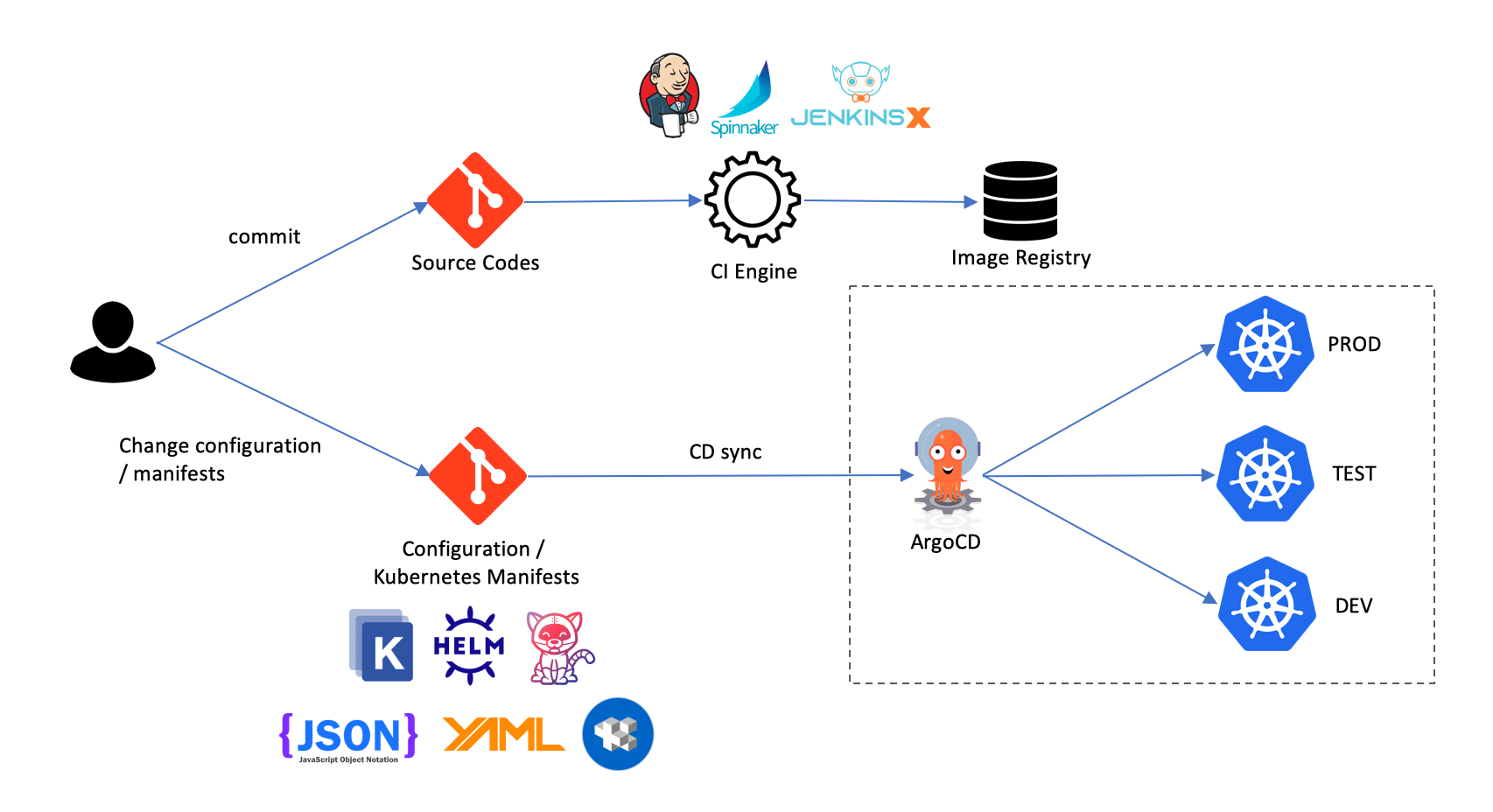
- Developer commits change to Git (application code, Kubernetes manifests, Terraform configs)
- CI pipeline runs - Tests, builds, creates artifacts
- Git repository updated with new manifest versions
- GitOps operator detects change - Compares repository state to cluster state
- Operator applies changes - Deploys new configuration to match Git
- Continuous reconciliation - Operator monitors for drift and auto-corrects
This loop runs continuously. Changes happen through Git commits, not manual kubectl commands or Terraform runs from laptops.
Infrastructure as Code + Git Workflows
GitOps extends infrastructure-as-code with Git workflows you already use for application development.
Pull requests for infrastructure changes. Code review before deployment. Approval processes. Discussion threads showing why changes were made.
Git history as audit log. Every change is tracked with who, what, when, and why. Rollback is git revert.
Branch-based environments - Feature branches deploy to dev environments. Main branch is production. Promoting changes is merging pull requests.
Implementation Strategy
Phase 1: Choose Your Tools
For Kubernetes:
- Flux - CNCF project, native Kubernetes experience
- Argo CD - Popular, excellent UI, extensive ecosystem
- Rancher Fleet - Multi-cluster management focus
For Infrastructure:
- Atlantis - Terraform pull request automation
- Terragrunt - Terraform wrapper with GitOps patterns
- Crossplane - Manage cloud resources as Kubernetes objects
Pick tools that fit your environment and team experience.
Phase 2: Structure Your Repositories
Organize Git repositories to separate concerns:
Mono-repo approach - Single repository containing all applications and infrastructure. Simpler to manage, easier to see dependencies, but can become large.
Multi-repo approach - Separate repositories for applications, infrastructure, and configuration. Better access control and CI/CD isolation, but more complex dependencies.
Repo-per-environment - Dev, staging, prod repos. Clear separation, but duplication and drift between environments.
There's no universally correct answer. Choose based on team size, organizational structure, and compliance requirements.
Phase 3: Define Deployment Workflows
Establish clear processes for different types of changes.
Application deployments - Developer merges code. CI builds and tests. CI updates manifest repository with new image version. GitOps operator deploys to cluster.
Infrastructure changes - Engineer creates Terraform change. Pull request triggers plan. Reviewers approve. Merge triggers apply. GitOps operator reconciles actual infrastructure.
Emergency rollbacks - Revert Git commit. GitOps operator automatically rolls back to previous state.
Phase 4: Implement Progressive Delivery
GitOps enables sophisticated deployment strategies:
Canary releases - Deploy new version to small percentage of traffic. Monitor metrics. Automatically roll back if errors increase.
Blue/green deployments - Deploy new version alongside old. Switch traffic when ready. Instant rollback if needed.
Feature flags - Deploy code to production but control feature visibility through configuration.
Tools like Flagger integrate with Argo CD and Flux to automate progressive delivery based on metrics.
Common Mistakes
Storing Secrets in Git
Never commit secrets to Git repositories, even private ones. Git history is permanent. Once a secret is committed, assume it's compromised.
Use secret management solutions (Vault, AWS Secrets Manager, Azure Key Vault) and reference them in manifests. Or use sealed secrets that encrypt secrets in Git and decrypt in-cluster.
No Clear Branching Strategy
Without branch policies, GitOps becomes chaotic. Define rules:
- What branches deploy to which environments?
- Who can approve changes to production branches?
- How do you handle hotfixes?
Document and enforce through branch protection rules.
Manual Intervention Undermines GitOps
If engineers can manually change production (kubectl apply, manual Terraform runs), configuration drift is inevitable.
Make Git the only way to change production. Restrict direct access. Route all changes through GitOps workflows.
Ignoring Observability
GitOps generates events: deployments, rollbacks, drift detection, reconciliation. Without observability, you're flying blind.
Integrate GitOps tools with monitoring and alerting. Track deployment frequency, success rates, rollback frequency, and drift incidents.
Your Next Move
Start with a non-critical environment. Implement GitOps for a development cluster or staging environment.
Define what goes in Git:
- Kubernetes manifests
- Helm charts
- Terraform configurations
- Application configurations
Deploy a GitOps operator. Point it at your repository. Watch it synchronize state.
Once comfortable, expand to production with appropriate safeguards: branch protection, code review, automated testing.
Work With Us
Tech Blend implements GitOps workflows for enterprises moving to continuous deployment while maintaining security and compliance.
If your organization needs help with:
- GitOps strategy and tooling selection
- Repository structure and branching workflows
- CI/CD pipeline integration with GitOps
- Progressive delivery and automated rollbacks
Get in touch: Email us at sales@techblendconsult.io
References
Want more insights like this?
Subscribe to get weekly DevSecOps guides, security best practices, and infrastructure tips delivered to your inbox.
No spam. Unsubscribe anytime.