DevSecOps: Moving Security Left in Enterprise Organizations
Dennis Weston
November 30, 2025
Quick Navigation
- The Problem
- What DevSecOps Actually Means
- Why Enterprises Need DevSecOps Now
- Implementation Strategy
- Common Mistakes
- Your Next Move
The Problem
Your development teams ship fast. Your security team finds issues after deployment. By the time vulnerabilities are discovered, they're in production, impacting customers, and expensive to fix.
This isn't a people problem. It's a process problem.
Traditional security operates as a gate at the end of development. Code gets written, features get built, then—right before release—security reviews everything and finds issues that should have been caught weeks ago. Now you're faced with a choice: delay the release or ship with known vulnerabilities.
Neither option is acceptable in a modern enterprise.
The Cost of Late-Stage Security
We've watched companies spend millions fixing security issues that could have been prevented for pennies. A SQL injection vulnerability caught in code review costs minutes to fix. The same vulnerability discovered in production costs weeks of emergency patches, customer notifications, potential data breaches, and regulatory fines.
The math is brutal:
- Design phase fix: 1x cost
- Development phase fix: 6x cost
- Testing phase fix: 15x cost
- Production fix: 100x cost
Yet most enterprises still wait until testing or production to seriously examine security.
What DevSecOps Actually Means
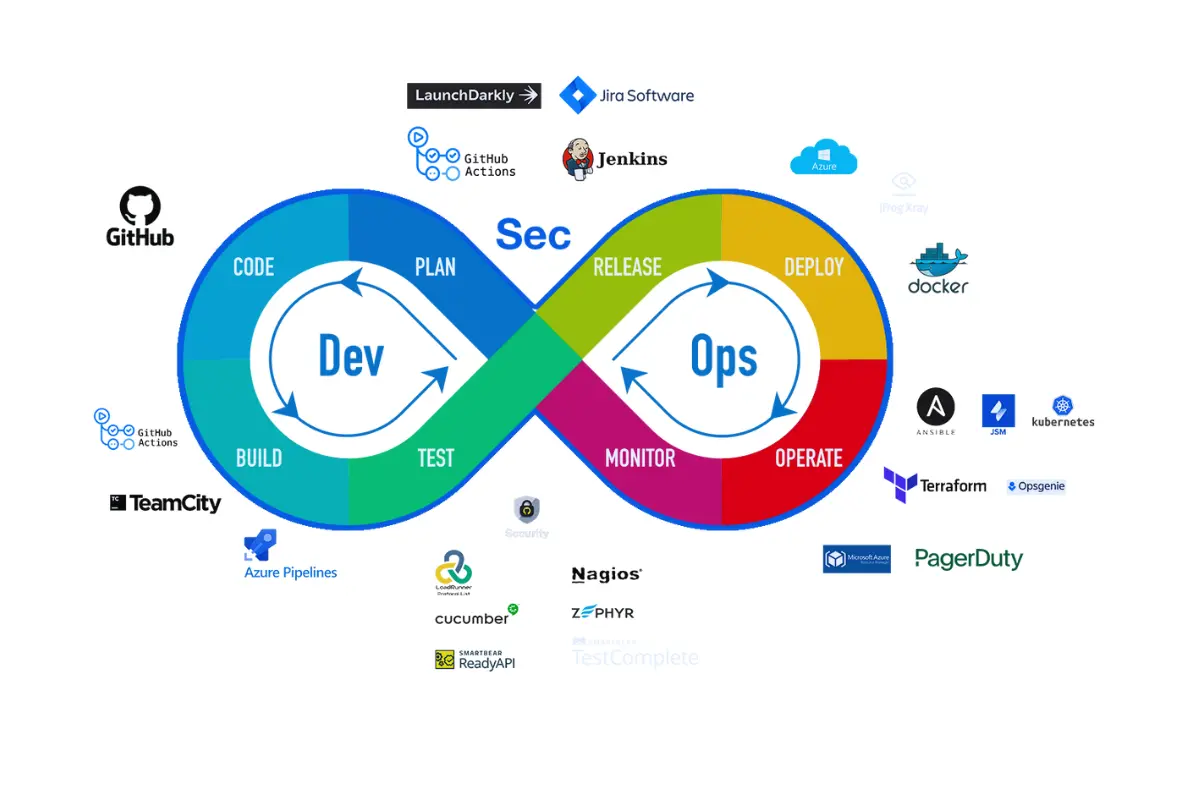
DevSecOps isn't about adding more tools or creating a new team. It's about fundamentally changing when and how security happens.
Instead of security as a gate, security becomes a guardrail. Instead of reviewing code after it's written, you prevent insecure code from being written. Instead of manual audits, you automate compliance checks into every deployment.
The Core Principles
Security is everyone's responsibility. Not just the security team. Developers write secure code. Operations teams deploy secure infrastructure. Product teams design secure features. Security teams enable all of this through tools, training, and automation.
Shift security left. Find issues during development, not after deployment. This means static analysis in IDEs, security checks in CI/CD pipelines, automated scanning of dependencies, and infrastructure-as-code validation before anything touches production.
Automate everything possible. Manual security reviews don't scale. Automated checks catch the common issues—SQL injection, XSS, exposed secrets, vulnerable dependencies—freeing security teams to focus on complex threats that actually require human expertise.
Measure and improve continuously. Track metrics. Mean time to remediate vulnerabilities. Percentage of security checks automated. Number of security issues caught before production. Use data to improve your process.
Why Enterprises Need DevSecOps Now
The regulatory environment has changed. GDPR, SOC2, HIPAA, PCI DSS, and industry-specific requirements now mandate security controls throughout the development lifecycle. "We'll add security later" isn't compliant anymore.
The threat landscape has evolved. Attackers target supply chains, dependencies, and CI/CD pipelines—not just production applications. If your build process is insecure, your application is insecure, regardless of how much security testing you do afterward.
The business expects faster delivery. Quarterly releases aren't competitive. You need weekly or daily deployments. Traditional security gates break this velocity. DevSecOps makes security compatible with speed.
Real Enterprise Impact
Financial services companies face regulatory audits that examine their entire SDLC. Without DevSecOps, they fail these audits or spend months preparing documentation to prove security controls exist.
Healthcare organizations handle PHI that must be protected from the moment code is written through deployment. Manual security reviews create bottlenecks that delay critical patient-facing features.
Enterprise SaaS companies serve customers who demand SOC2 Type II compliance. DevSecOps provides the automated controls and audit trails required to pass these assessments.
Implementation Strategy
Phase 1: Assess Current State
Map your current development lifecycle. Where does code get written? How does it move from development to production? Where do security checks happen today? Where are the gaps?
Identify your biggest risks. What types of vulnerabilities appear most frequently in your applications? Where have security incidents originated? What compliance requirements do you need to meet?
This assessment reveals where to start. Don't try to fix everything at once.
Phase 2: Automate Security in CI/CD
Start with your build pipeline. Every code commit should trigger automated security checks:
Static Application Security Testing (SAST) - Scan source code for common vulnerabilities before it's even compiled. Catch SQL injection, XSS, hardcoded credentials, and other OWASP Top 10 issues during the pull request, not in production.
Dependency Scanning - Check third-party libraries and packages for known vulnerabilities. Most applications use hundreds of dependencies. Many contain CVEs. Automated scanning catches these before they reach production.
Secret Scanning - Prevent credentials, API keys, and tokens from being committed to source control. Once secrets are in git history, they're compromised. Catch them before the commit.
Infrastructure-as-Code Security - Validate Terraform, CloudFormation, and Kubernetes manifests for security misconfigurations. Prevent public S3 buckets, overly permissive IAM roles, and insecure network policies before infrastructure is deployed.
These checks run automatically. Developers get immediate feedback. Issues are caught early when they're cheap to fix.
Phase 3: Enable Developers
Give developers the tools to write secure code from the start.
IDE Plugins - Security analysis directly in the code editor. Developers see issues as they type, not days later in a security report.
Secure Code Templates - Pre-approved patterns for common operations—database queries, API calls, authentication. Developers start with secure defaults instead of figuring out security from scratch.
Training and Documentation - Not generic security training. Specific guidance on the vulnerabilities that actually appear in your codebase, with examples of how to fix them.
When developers can self-serve security, velocity increases and quality improves.
Phase 4: Measure and Improve
Track meaningful metrics:
- Time from vulnerability discovery to remediation
- Percentage of security issues caught before production
- Number of security checks automated vs. manual
- Mean time to detect security incidents
- Developer satisfaction with security tools
Use these metrics to identify bottlenecks and iterate on your process.
Common Mistakes
Buying Tools Without Process
DevSecOps isn't a product you purchase. It's a practice you build. Companies buy expensive security platforms, deploy them, then wonder why nothing improves. Tools only work when integrated into workflows that developers actually use.
Start with process. Then add tools that support that process.
Making Security a Blocker
If every security check requires manual approval, you've created a bottleneck that slows delivery without improving security. Developers will find workarounds—shadow IT, exceptions, "temporary" bypasses that become permanent.
Automate the common cases. Reserve manual review for genuinely complex security decisions.
Ignoring Developer Experience
Security tools that interrupt flow or generate excessive false positives get disabled. Developers optimize for shipping features. If security makes that harder without clear value, it gets bypassed.
Invest in tools that fit developer workflows. Fast feedback. Low false positive rates. Clear remediation guidance. When security helps developers ship faster (by catching issues early), adoption becomes natural.
No Clear Ownership
DevSecOps requires collaboration between security, development, and operations. Without clear ownership of specific outcomes, nothing improves. Security blames developers for writing insecure code. Developers blame security for unrealistic requirements. Operations blames both for creating operational headaches.
Assign ownership. Someone owns the security posture of each application and has authority to make changes across teams.
Your Next Move
Start small. Pick one application or one team. Implement automated security checks in their CI/CD pipeline. Measure the results. Learn what works.
Then expand. Add more checks. Involve more teams. Build on success.
The goal isn't perfection on day one. It's continuous improvement toward a state where security is built in, not bolted on.
Common starting points:
- Add secret scanning to prevent credential leaks
- Implement dependency scanning to catch vulnerable libraries
- Enable SAST for common vulnerability patterns
- Automate infrastructure security validation
Each of these delivers immediate value and builds momentum for broader DevSecOps adoption.
Work With Us
Tech Blend helps enterprises implement DevSecOps practices that actually work. We've built security automation for organizations handling sensitive financial data, healthcare information, and customer PII. We know how to shift security left without slowing delivery.
If your organization needs help with:
- Security automation in CI/CD pipelines
- Developer enablement and secure coding practices
- Compliance integration (SOC2, HIPAA, PCI DSS)
- Tool selection and implementation
Get in touch: Email us at sales@techblendconsult.io
References
Want more insights like this?
Subscribe to get weekly DevSecOps guides, security best practices, and infrastructure tips delivered to your inbox.
No spam. Unsubscribe anytime.